

Finding the right workout planner app means matching the tool to how you actually train. This guide breaks down the best workout planner apps of 2026, comparing Jefit, Fitbod, Strong, Ladder, and Nike Training Club across adaptive planning, custom routine building, exercise libraries, progressive overload, and price. Scenarios that actually matter to lifters.
Quick Answer
The right workout planner app depends entirely on how you train — not which app has the longest feature list. Here’s the short version:
- Beginner who wants automation → Fitbod or Jefit Adaptive Plan
- Want to follow a guided video program, no manual logging → Nike Training Club or Ladder
- Data-driven, tracking every set → Jefit or Strong
- Building a complex custom split → Jefit (multi-week) or Strong (simple weekly)
- Want auto-adaptive sessions based on recovery → Fitbod
- Training in multiple locations → Fitbod or Jefit
Table of Contents
- How we evaluated these apps
- Scenario 1: “I’m a beginner — just tell me what to do”
- Scenario 2: “I want to follow a structured program”
- Scenario 3: “I want to build my own custom routine”
- Scenario 4: “I want the app to adapt to my recovery”
- Scenario 5: “My training setup changes — gym, home, travel”
- Full comparison table
- Pricing
- Frequently Asked Questions
How We Evaluated Each Workout Planner App
We tested six apps — Jefit, Fitbod, Strong, Setgraph, Ladder, and Nike Training Club — against five criteria that actually separate a good workout planner app from a basic tracker:
- Planning automation — Does the app generate a structured plan for you, or do you build everything manually?
- Customization depth — How precisely can you control exercise selection, split design, rep ranges, rest times, and program length?
- Progressive overload support — Does the app track your performance history and tell you when to increase load? According to the 2026 ACSM Position Stand on Resistance Training, progressive overload is the primary driver of long-term strength and muscle development. An app that doesn’t support this will eventually stop producing results.
- Exercise library and guidance — How many exercises are available, with what quality of instruction and filtering capability?
- Flexibility and value — Does it work across different equipment setups? What does it cost, and what’s actually free?
Scenario 1: “I’m a beginner — I just want to be told what to do.”
What matters most in this scenario
When you’re new to the gym, you don’t want to research periodization before your first session. You want the app to ask a few questions, hand you a plan, and get you started. What separates apps here is the quality of that automated plan — and whether it keeps working as you get stronger.
How each workout planner app performs
Jefit
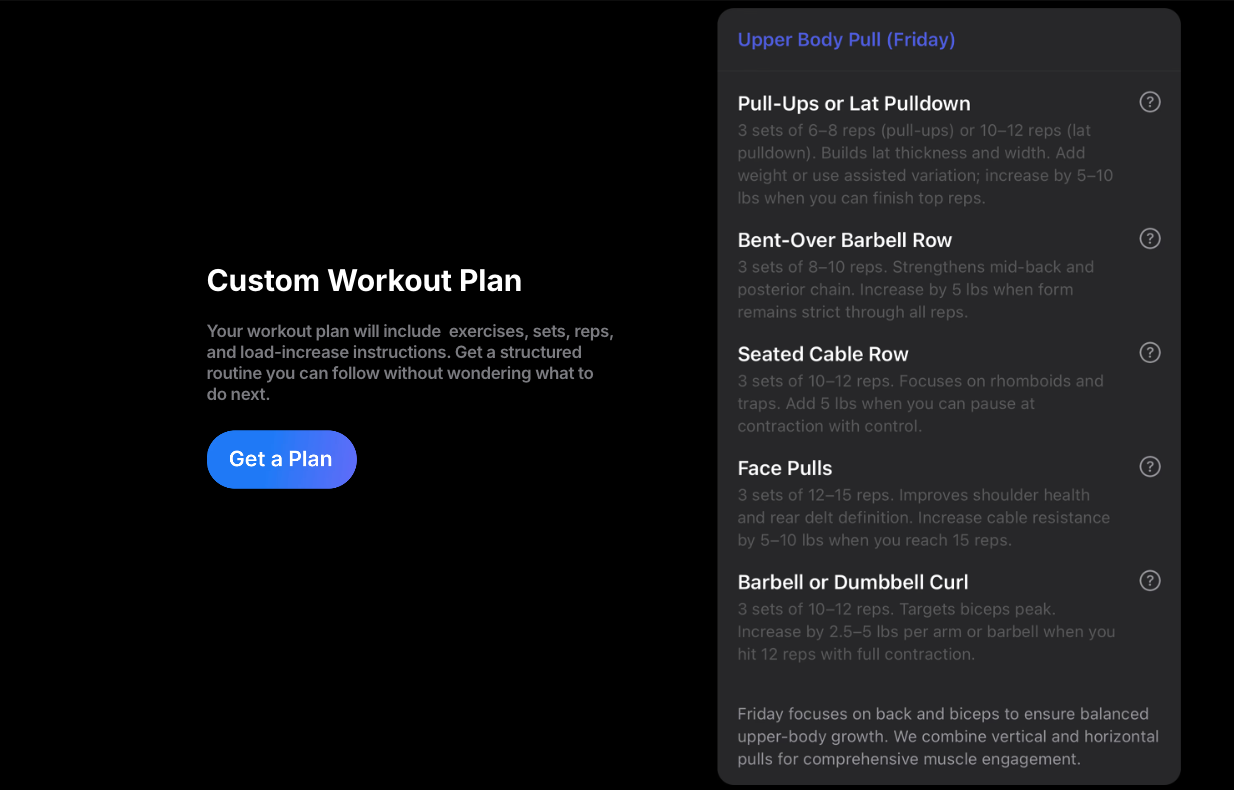
Jefit’s Adaptive Plan is AI-powered training that adapts in real-time. You answer some setup questions — goal, fitness level, training days per week, available equipment, and any injuries — and Jefit builds a complete structured mesocycle plan. A mesocycle gives your training a shape: volume increases across weeks, loads climb as you get stronger, and a planned deload follows before the next block begins. It’s how serious lifters actually program. Jefit applies this structure automatically.
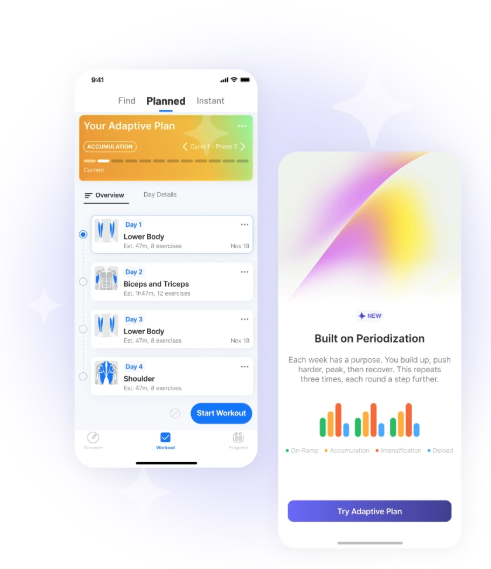
As you log sessions, the Load Progression algorithm monitors your performance and prompts you to add weight when you’ve hit your targets consistently — aligned with ACSM’s recommendation of a 2–3% load increase once a workload feels manageable. Seeing the full week upfront helps beginners understand the structure of their program, not just blindly follow it.
Fitbod
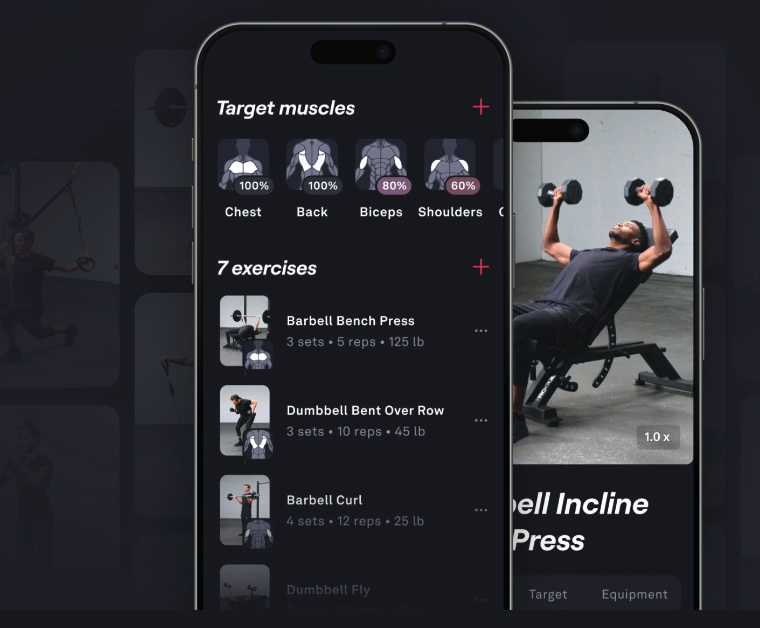
Fitbod is a strong option if you want minimum friction and no decisions. You input your goals, available equipment, and fitness level. Fitbod then generates each session automatically, adapting around what you trained last time and which muscles it estimates are recovered. The algorithm handles progressive overload, muscle balance, and exercise variety — you just show up and lift.
The main limitation: Fitbod costs $95.99/year with no free tier, and there’s no way to see your full week of sessions planned in advance.
Setgraph
Setgraph has an AI workout plan generator that tailors a routine to your goals, schedule, and available equipment. Its interface is minimal and approachable — a good entry point if you want something clean without a steep learning curve. It doesn’t have Fitbod’s session-level recovery adaptation or Jefit’s depth of progressive overload tooling, but it’s a capable option.
❌ Strong, Ladder, and Nike Training Club aren’t the right fit for this scenario. Strong doesn’t generate a plan. Ladder and Nike TC are better covered in Scenario 2.
Scenario 2: “I want to follow a structured program.”
Are you following along, or are you tracking data?
“Following a program” means two very different things depending on the person. Getting this distinction right is what determines the right workout planner app for you.
If you prefer following a video — no manual logging
Nike Training Club and Ladder are built for this.
Nike Training Club
Nike Training Club has 500+ coach-led video workouts available free — a real trainer on screen demonstrates every rep in sequence and you follow along. Multi-week structured programs like “Get Strong” or “Get Lean” are available inside the app, with sessions that build on each other. You don’t log sets or weights manually. You just keep up with the video.
Ladder
Ladder goes further. A real human coach designs your weekly program and delivers it through the app, with video demonstrations for every movement. You follow what your coach prescribes, with in-app messaging for questions and team accountability built in.
Neither app makes you think about sets, reps, or weight selection — which removes a real barrier for people who find manual logging tedious or confusing. The trade-off is that you lose your data. You can’t see whether you pressed more weight than last month, or whether your squat has actually improved. If that doesn’t matter to you, both are excellent options.
If you’re data-driven and want to track every lift in your workout planner app
Jefit and Strong are the better choices here.
Jefit
Jefit‘s community library includes the Reddit Recommended Routine, Jeff Nippard 4-day split, the Metallicadpa PPL — the original linear progression push/pull/legs program widely recommended across r/Fitness — GZCLP, StrongLifts 5×5, and hundreds more, all pre-loaded with exercises, sets, and reps and ready to track from your first session. Every workout is logged with full history, performance charts, and progression tracking.
Strong
Strong also handles any program cleanly. Its interface is fast — you can log a set in two taps mid-workout, which matters when you’re under a bar. Strong doesn’t have a community routine library the size of Jefit’s 12 million members, but if you already know what program you want to run, Strong executes it with less friction.
Setgraph sits in between — solid program tracking with a clean interface, but a smaller community base.
Bottom line for program followers
Follow a video with no manual logging → Nike Training Club (free) or Ladder (coach-led premium).
Track every set with real data → Jefit (largest community library) or Strong (fastest logging experience).
Scenario 3: “I’m intermediate or advanced — I want to build my own routine.”
What actually matters when you’re designing your own split
At this level, you know what you want. You have a split in mind — maybe a 4-day upper/lower, a 6-day PPL with specific exercise ordering, or an 8-week block that periodizes volume across a mesocycle. You’re not looking for the app to make decisions. You want it to let you build what you’ve designed and track it reliably.
The questions that separate apps here: How deep is the exercise library? Can you filter by muscle group or movement pattern? How do you handle multi-week program structure? And how many concurrent routines can you maintain?
How each app handles custom routine building
Jefit
Jefit is the strongest workout planner app for intermediate and advanced lifters who want detailed, complex programs. A few things that aren’t available in any other app here:
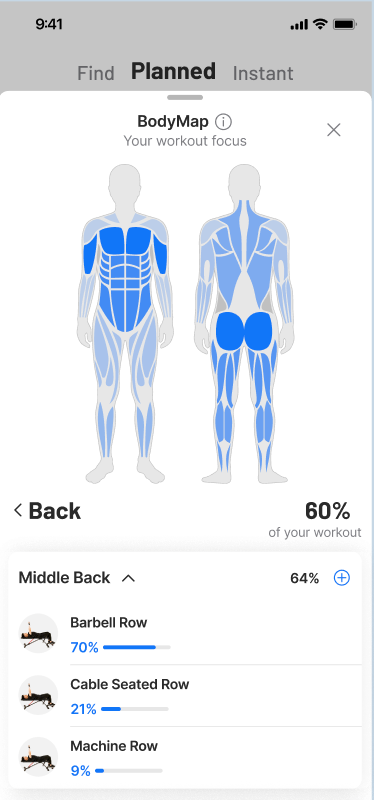
- Body Map — tap any muscle on a front/back anatomical diagram to see every exercise targeting it as a primary or secondary mover. Useful for building balanced splits, fixing weak points, or targeting specific muscle heads (e.g., all three heads of the deltoid, both biceps heads)
- Movement pattern filter — browse exercises by push, pull, squat, hinge, carry, and rotation. You can build a session around patterns rather than isolated muscles
- 1,500+ exercise library with animated demonstrations, muscle activation diagrams, and equipment filters. Browse at jefit.com/exercises
- Up to 31-day routines — Jefit lets you build a single routine that spans up to 31 days. This means you can program a full mesocycle, a 4-week periodized block, or a 5/3/1 cycle as one complete unit — including planned variation across weeks
- Unlimited routines on Elite — maintain separate programs for strength phases, hypertrophy blocks, home training, and travel
Strong
Strong is a legitimate and widely used choice for custom split building — particularly for intermediate lifters running a standard weekly structure. Its logging interface is faster than most apps and its routine builder is clean and functional. The important structural limitation: in Strong, one routine equals one training day. There’s no multi-day or multi-week program container. If you’re running a simple PPL or Upper/Lower that repeats the same template every week, this works fine — you build Push, Pull, and Legs as separate routines and rotate through them. If you need planned variation across weeks — where Week 1 is higher volume, Week 2 is heavier, Week 3 is a deload — you manage that manually, which becomes awkward for complex periodization. For weekly splits: Strong is excellent. For mesocycle-level programming: Jefit’s 31-day structure handles it more cleanly.
Setgraph
Setgraph offers clean routine building with set targets, notes, and muscle group organization. Its interface is simpler than both Jefit and Strong. It’s a good fit for intermediate lifters who want a streamlined builder without Jefit’s depth. It doesn’t have the body map or movement pattern filtering.
Fitbod, Ladder, and Nike Training Club are not designed for self-directed custom programming.
Bottom line for custom routine builders
Simple repeating weekly splits, fast execution: Strong.
Complex periodized programs, muscle-group precision, multi-week structure: Jefit.
Clean and minimal, moderate customization: Setgraph.
Scenario 4: “I want the workout app to adjust my workouts based on how I’m recovering.”
What session-adaptive planning actually means
This is a different use case from just “having a plan.” Session-adaptive planning means the app looks at your recent training history, estimates which muscles are still fatigued, and adjusts today’s workout to focus on what’s most recovered. The goal is to avoid overtraining some muscles while undertraining others — and to make the right call every session without you having to think about it.
Which app wins here?
Fitbod
Fitbod — and it’s not close. This is Fitbod’s core product, and nothing else in this comparison matches it for session-level adaptive logic.
Fitbod’s algorithm tracks the volume and intensity of every exercise you’ve done, estimates muscle recovery across your whole body, and generates each session around what’s most ready to train. If you hammered chest on Monday, Tuesday’s session won’t load it again. If you’ve been skipping rear delts, the algorithm will weight toward them. You can adjust session length, available equipment, and target muscle focus, but the fundamental exercise selection and loading decisions are handled by the algorithm. For lifters who want to feel like the app is responding intelligently to their body, Fitbod delivers.
Jefit
Jefit’s Adaptive Plan adapts at the program and load level — the Load Progression algorithm adjusts weight targets as your performance improves — but it doesn’t dynamically reshuffle exercise selection session-by-session based on recovery estimates. It’s adaptive over weeks, not across individual sessions.
Setgraph
Setgraph has AI planning but doesn’t offer the same session-level recovery logic.
Scenario 5: “My training setup changes — gym, home, and travel.”
What makes a workout planner app work across multiple locations
Training flexibility isn’t just about having a “home workout mode.” It’s about how fast you can adapt when circumstances change — a hotel gym with only dumbbells, a garage with a barbell but no cables, a full commercial gym. The two approaches that work are: pre-built profiles per location, or on-the-fly session generation.
How each app handles it
Fitbod
Fitbod handles this with the least friction. Before each workout, you tell it what equipment is available right now, and it generates a session around those constraints. Switching from a full barbell gym to a hotel with only dumbbells takes a few taps — update the equipment for that session and the algorithm rebuilds the workout entirely. You don’t maintain separate routines per location; the session-based model handles it automatically.
Jefit
Jefit offers two ways to handle this. The Instant Workout feature lets you configure a session on the fly — pick the target muscles, session duration, and available equipment, and Jefit generates a workout from those parameters. For more structured training, you can build separate saved routines for each setup (e.g., “Gym — Full Equipment,” “Home — Dumbbell Only,” “Travel — Bodyweight”) and switch between them. Jefit Elite users can maintain unlimited saved routines, so this scales well if your setups are consistent. The Instant Workout is the closer equivalent to Fitbod’s flexibility — useful when your situation changes unexpectedly.
Setgraph
Setgraph lets you note equipment per routine and adjust manually, but doesn’t have Fitbod’s dynamic per-session generation or Jefit’s gym profile system.
❌ Strong requires pre-built routines for each setup. Workable if you have two or three consistent locations, less practical when equipment varies frequently and unexpectedly.
❌ Ladder and Nike Training Club have limited equipment flexibility — your coach decides or you pick from a fixed video library.
Bottom line for flexible training
Quickest per-session equipment adjustment with no setup: Fitbod.
Structured multi-location setup with session-level flexibility: Jefit (Instant Workout + unlimited routines on Elite).
Full Workout Planner App Comparison
| Jefit | Fitbod | Strong | Setgraph | Ladder | Nike TC | |
|---|---|---|---|---|---|---|
| Adaptive plan | ✅ Week-level | ✅ Session-level | ❌ | ✅ Basic | Coach-led | ❌ |
| Progressive overload | ✅ Load Progression | ✅ | Manual | Basic | Coach-led | ❌ |
| Custom routine builder | ✅ Up to 31 days | Limited | ✅ Per day | ✅ | ❌ | ❌ |
| Body map / muscle planning | ✅ | Partial | ❌ | ❌ | ❌ | ❌ |
| Movement pattern filter | ✅ | ❌ | ❌ | ❌ | ❌ | ❌ |
| Pre-built / community programs | ✅ 12M+ members | ❌ | Some | Some | ❌ | Video series |
| Video-guided workouts | ❌ | ❌ | ❌ | ❌ | ✅ | ✅ |
| Exercise library | 1,500+ | ~1,000+ | Smaller | Moderate | Coach-only | ~500 sessions |
| On-the-fly equipment filter | ✅ Instant Workout | ✅ Per session | ❌ | Limited | ❌ | Limited |
| Apple Watch | ✅ | ✅ | ✅ | ✅ | ✅ | ✅ |
| Offline mode | ✅ | ✅ | ✅ | ✅ | ✅ | Limited |
| Free tier | ✅ | ❌ | Limited | ✅ | ❌ | ✅ |
| Monthly price | $12.99 | $15.99 | $4.99 | Free/low | ~$29–35 | Free |
Pricing
| App | Free Tier | Paid Plan | What Paid Unlocks |
|---|---|---|---|
| Jefit | ✅ Planner + full library | $12.99/mo or $69.99/yr | Unlimited routines, load progression, advanced analytics, ad-free |
| Fitbod | 3 workouts trial only | $15.99/mo or $95.99/yr | Full AI session generation, all features |
| Strong | 3 routines | $4.99/mo or $29.99/yr | Unlimited routines, advanced charts |
| Setgraph | ✅ Core features | Low cost | Advanced analytics, AI planning features |
| Ladder | ❌ | ~$29–35/mo | Coach-led weekly programming, team access |
| Nike TC | ✅ Most content | Free | — |
Frequently Asked Questions
Which workout planner app is best for beginners?
Fitbod and Jefit are both strong options. Fitbod generates each session automatically based on your recovery — zero programming decisions required — but costs $15.99/month with no free tier. Jefit’s Adaptive Plan builds a full weekly program from five setup questions and shows you the structure in advance, with progressive overload built in and a free tier available.
Is Nike Training Club good for structured training?
Yes, if you want to follow along with a video without manually tracking sets and weights. Nike Training Club’s multi-week programs have a trainer on screen guiding every rep — no logging required. The limitation is you don’t accumulate data: there’s no record of the weights you used or how your strength progressed over time.
What is the difference between Jefit and Strong for building a custom routine?
The key difference is program length. In Strong, one routine equals one training day — you manage multi-week variation manually. Jefit supports routines up to 31 days, so you can program a full mesocycle or periodized block as a single contained program. For simple repeating weekly splits, either workout planner app works well. For complex multi-week structures, Jefit handles it more cleanly.
Does Fitbod adjust workouts based on muscle recovery?
Yes — this is Fitbod’s defining feature. It estimates recovery based on your training history and generates each session around what’s most ready to train. No other app in this comparison matches this session-level adaptation.
Can I use Jefit without knowing how to program?
Yes. Jefit’s Adaptive Plan handles all programming decisions automatically. You answer five questions — goal, fitness level, schedule, available equipment, and any injuries — and the app builds your weekly plan. As you train, the Load Progression algorithm tracks performance and tells you when to increase weight.
What is Jefit’s Instant Workout feature?
Instant Workout lets you generate a session on the fly by setting three parameters — target muscle groups, session duration, and available equipment. Jefit builds a workout from those constraints without you needing a pre-built routine. Useful when your equipment or schedule changes unexpectedly.
What is the difference between Jefit and Fitbod for multi-location training?
Fitbod adjusts equipment per session with no pre-setup required — update your available equipment before a workout and the algorithm adapts. Jefit’s Instant Workout offers similar on-the-fly flexibility, and Elite users can also maintain unlimited pre-built routines per location for more consistent programming.
Which app has the most exercises?
Jefit, at 1,500+ exercises with animated demonstrations, muscle activation diagrams, and filters for muscle group, movement pattern, equipment, and difficulty. Fitbod has approximately 1,000+. Strong’s library is smaller and doesn’t include animated demos.
External sources referenced
- ACSM Position Stand: Resistance Training Prescription for Healthy Adults
- ACSM Health & Fitness Journal: Ten Ways to Implement Progressive Overload
- The Fitness Wiki: Recommended Routines (r/Fitness)
